Order Blocks
Minimum bars needed: 2 × swing_length + 1 bars
(default params: 21 bars (swing_length=10))
Swing pivots need swing_length bars on each side to be confirmed. After the first pivot is confirmed, new order blocks can appear in real-time.
✅ After the warmup window is filled, this indicator produces a new value on every incoming bar in real-time.
Order blocks appear after pivot confirmation, not after smoothing delay.
| Event | Lag | Detail |
|---|---|---|
| Order block zone appears | ≈ swing_length bars after the pivot | Swing pivots need swing_length bars on each side to be confirmed |
| Signal fires when price returns to zone | 0 bars | Once the zone exists, the signal fires instantly when price enters it |
Order Blocks are zones where institutional traders (banks, hedge funds) placed large orders, causing significant price moves. They represent areas of supply and demand imbalance that often act as support/resistance when price returns.
Bullish Order Block: The last bearish candle before a strong upward move. When price returns to this zone, it often bounces up (support).
Bearish Order Block: The last bullish candle before a strong downward move. When price returns to this zone, it often reverses down (resistance).
Breaker Blocks: When an Order Block is broken (invalidated), it becomes a breaker block and may act as the opposite type of support/resistance.
def order_blocks(
    data: Union[PdDataFrame, PlDataFrame],
    swing_length: int = 10,
    use_body: bool = False,
    high_column: str = 'High',
    low_column: str = 'Low',
    open_column: str = 'Open',
    close_column: str = 'Close',
    bullish_ob_column: str = 'bullish_ob',
    bearish_ob_column: str = 'bearish_ob',
    bullish_ob_top_column: str = 'bullish_ob_top',
    bullish_ob_bottom_column: str = 'bullish_ob_bottom',
    bearish_ob_top_column: str = 'bearish_ob_top',
    bearish_ob_bottom_column: str = 'bearish_ob_bottom',
    bullish_breaker_column: str = 'bullish_breaker',
    bearish_breaker_column: str = 'bearish_breaker'
) -> Union[PdDataFrame, PlDataFrame]:
Example
import pandas as pd
from pyindicators import order_blocks, ob_signal, get_active_order_blocks

# Create sample OHLC data
df = pd.DataFrame({
    'Open': [100, 102, 101, 105, 110, 108, 112, 115, 113, 118],
    'High': [103, 104, 106, 112, 115, 112, 118, 120, 117, 122],
    'Low': [99, 100, 100, 104, 108, 106, 110, 113, 111, 116],
    'Close': [102, 101, 105, 110, 108, 110, 115, 113, 116, 120]
})

# Detect Order Blocks
df = order_blocks(df, swing_length=5)
print(df[['bullish_ob', 'bearish_ob', 'bullish_ob_top', 'bullish_ob_bottom']])

# Generate signals when price enters an OB zone
df = ob_signal(df)
print(df['ob_signal'])  # 1 = in bullish zone, -1 = in bearish zone, 0 = outside

# Get currently active Order Blocks
active = get_active_order_blocks(df, max_bullish=3, max_bearish=3)
print(f"Active bullish OBs: {len(active['bullish'])}")
print(f"Active bearish OBs: {len(active['bearish'])}")
The function returns columns for:
bullish_ob/bearish_ob: 1 when Order Block is detected, 0 otherwisebullish_ob_top/bullish_ob_bottom: Zone boundaries for bullish OBsbearish_ob_top/bearish_ob_bottom: Zone boundaries for bearish OBsbullish_breaker/bearish_breaker: 1 when OB is broken (becomes breaker block)
The ob_signal function generates signals:
- 1: Price is within a bullish OB zone (potential long entry)
- -1: Price is within a bearish OB zone (potential short entry)
- 0: Price is outside any OB zone
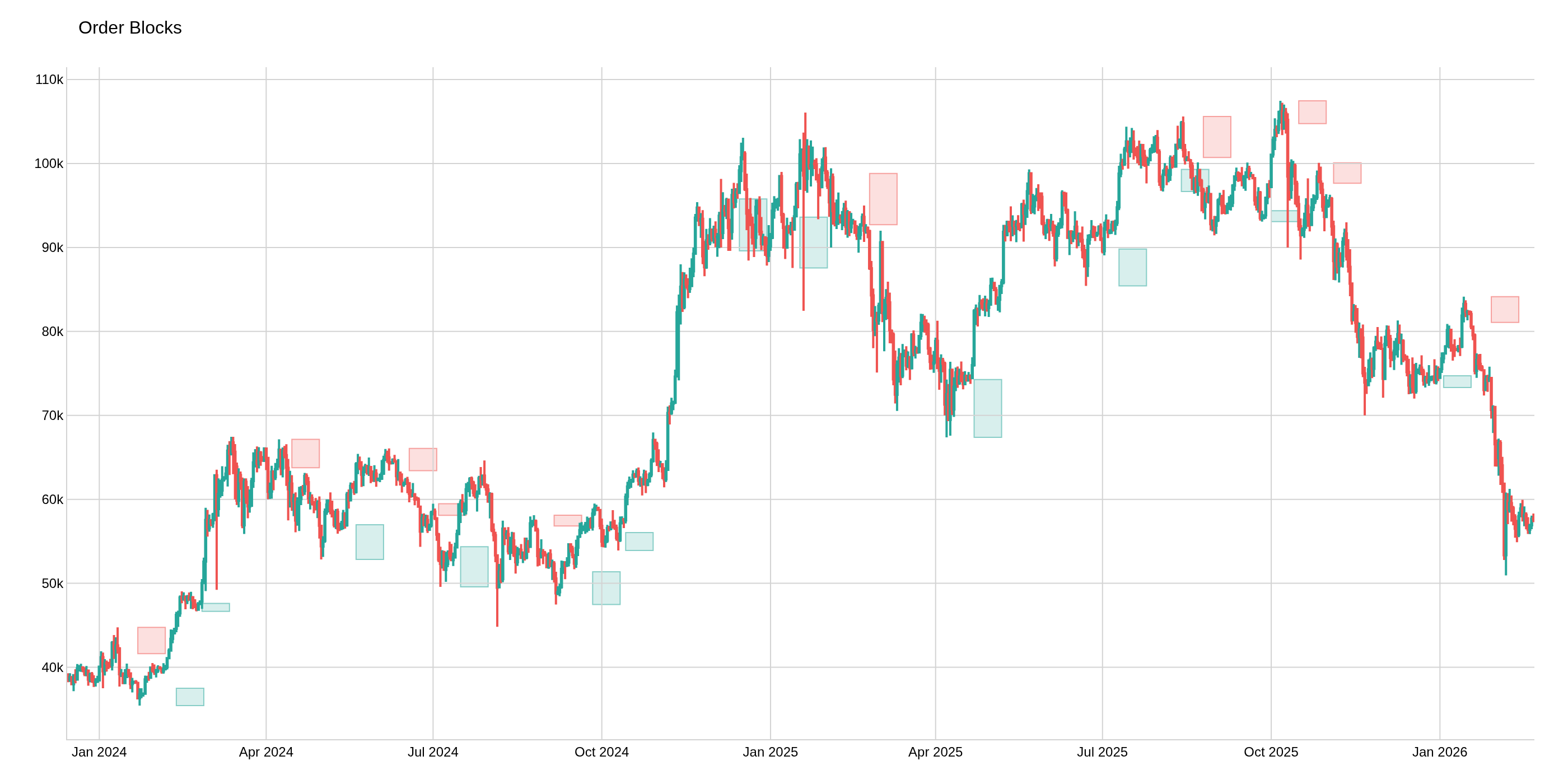
The image above uses the following parameters:
| Parameter | Value |
|---|---|
swing_length | 10 |